





Tips Index
Magic Internet provided a German video hosting service website known as MyVideo in Bucharest, Romania, and later in Berlin. The website Myvideo.at, MyVideo.ch and Myvideo.de were available in German not until April of 2016.
The German realm was in the 1000 most visited websites on the internet. They organized their service in 2006 and had approximately 200 000 visitors every day in 2011 according to Alexa Internet.
The users were able to upload, watch, and rate videos and share them to other social networking sites. Today MyVideo is just an entertainment news platform, a video demand service of a European mass media company called ProSiebenSat.1 Media.
Quazer.com replaced the previous video hosting service and was also later sold to Pluto TV.
Well, as the years have passed, MyVideo became a Movie portal and a video sharing site that is becoming popular each passing day. That just makes all the viewers and users of Myvideo be impatient in finding a solution on how to download Myvideo videos and watch them offline at their convenience.
There are a number of available tools out there that can download videos in different video sharing sites but there are just a few tools that support Myvideo. So in this article, we introduce you to the most dynamic and powerful MyVideo downloader software called VideoPower RED.
The software can download videos from different streaming sites like YouTube, MyVideo, Crunchyroll, Naver, TED, Dailymotion, Vevo, Facebook, and many more. In addition, you can also stream while downloading your videos in the built-in browser.
You can choose the quality of the video, set the format of the video or audio that you want to download before downloading. You can also convert your downloaded video to other formats for VideoPower RED has also a converter that has a wide array of formats you can choose from.
Just click the link below to download this free Myvideo downloader and follow through the steps on How to download MyVideo Videos
Method 1: Copy and Paste MyVideo’s Url
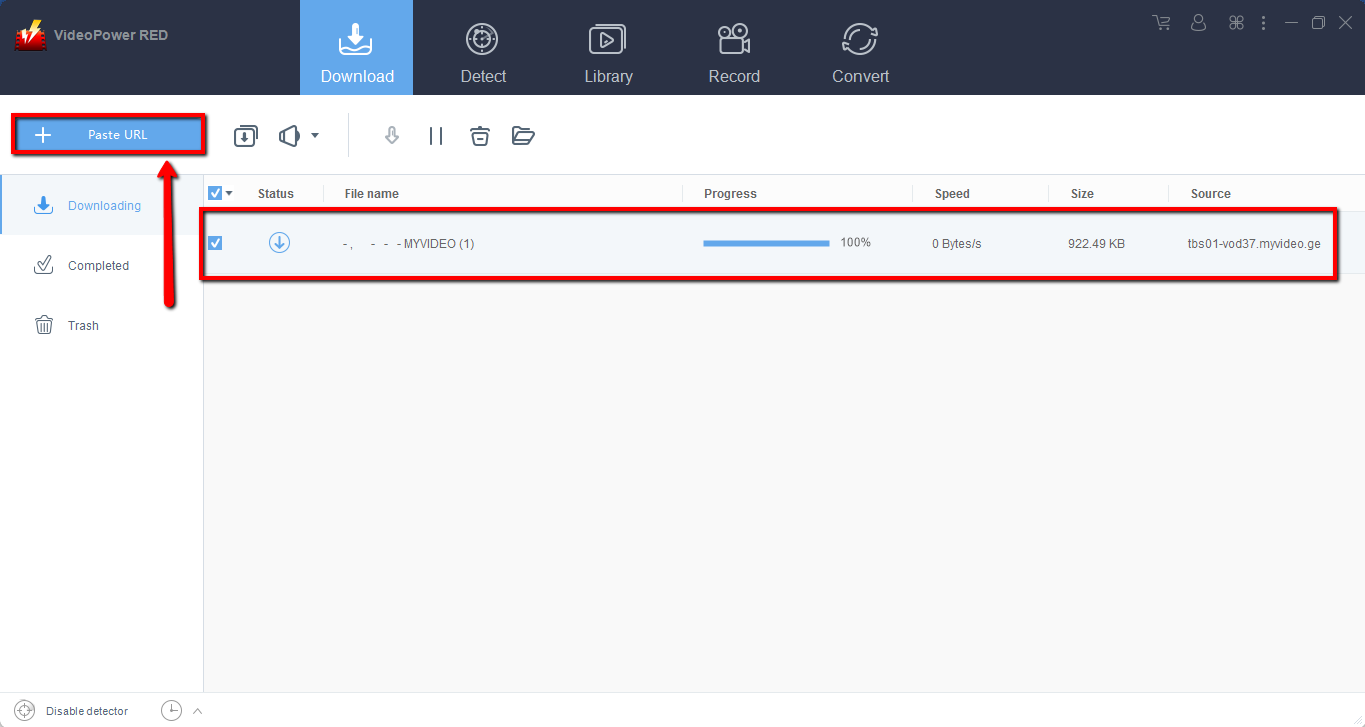
Step 1: Copy and Paste URL to download videos from MyVideo
Copy the link of the MyVideo that you want to download and then paste it into the program by clicking the “Paste URL” button. After that, you will see the video is downloading in the download control panel.
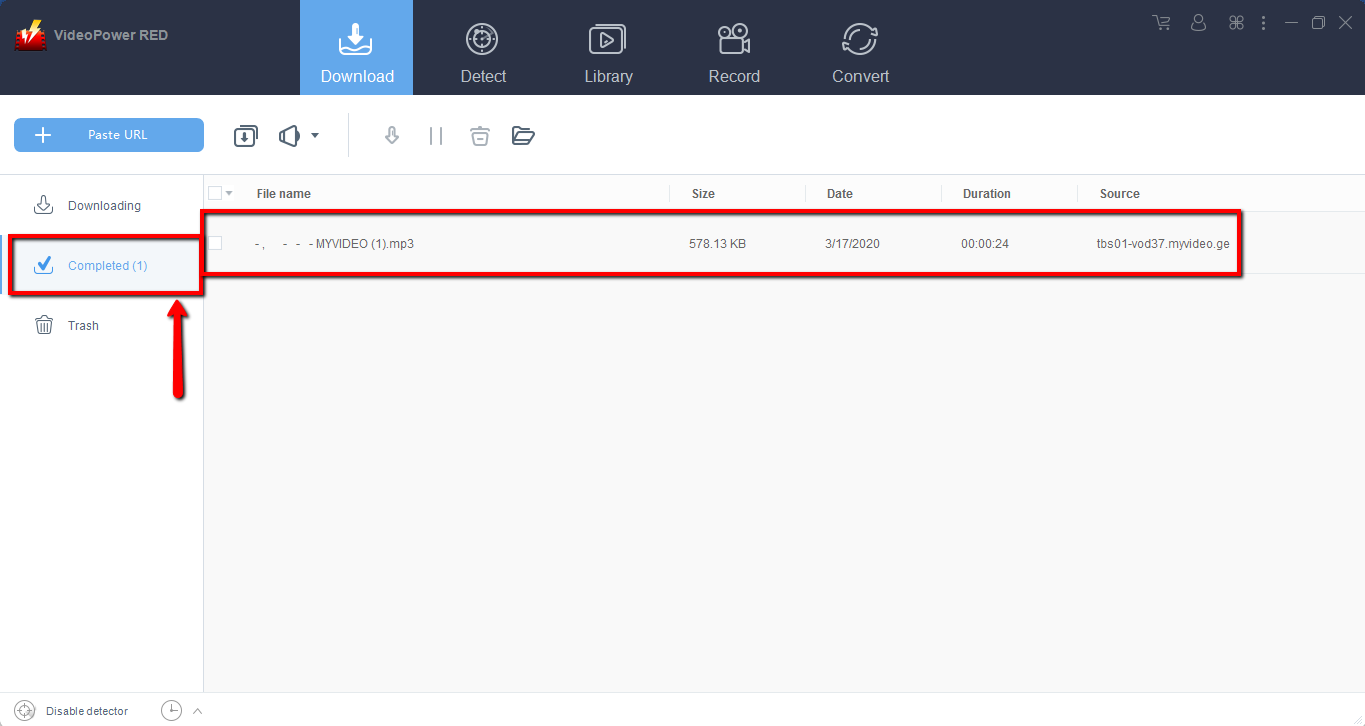
Step 2: Check the downloaded MyVideo file
Wait for the MyVideo downloader to finish, and then go to the “Completed” section to find the downloaded video. Right-click to do more operations and double-click to preview.
Method 2: Use the Embedded Browser to Download MyVideo
Step 1: Open the video page via an embedded browser
If the program supports the site, the video will be downloaded automatically after the “Media File Detected” notice appear.

Step 2: Check the downloaded MyVideo file
Wait for the download to finish, and then go to the “Completed” section to find the downloaded video. Right-click to do more operations and double-click to preview.

Method 3: Screen Record MyVideo.
Sometimes because of the web update or slow internet connection, the program can’t download MyVideo anymore but you can still save the video by using the recording function.
Step 1: Set Recording Mode
Click the “Record” tab to open the record window and select among the following recording modes such as “Region, Fullscreen, around mouse, and Web camera” to capture the exact and desired range of your screen. Click the preferred one and start recording.

Step 2: Check the recorded MyVideo file.
After recording, the recorded file can be seen in the record interface. Right-click to do more operations and double-click to preview.

Conclusion:
VideoPower RED has an automatic download option, so grabbing Myvideo and videos from any site you wish is extremely fast with satisfying output quality. What is so good about this app is that it comes with a built-in browser that lets you visit another site and download videos from it directly using its auto-detection feature. Additionally, you can copy the URL of the video from the address bar of the tool and paste it into the app’s Copy and Paste feature to fetch the video. Download the best Myvideo downloader and enjoy watching it offline!


