





Video Download | Record | Convert
Batch download youtube playlist
Record screen and audio with real-time annotation
Trim, crop, rotate video with a strong video editor
Windows 7 / 8 / 8.1 / 10 supported
Video Power
RED

Overview
For All of Your Downloading Needs!

Download Video

Download Music

Record Screen

& Music

Edit Video

Convert Video
Multiple ways of downloading that you can choose from, paste url to download, playback by embeded browser and download automatically, or enable the external detector to download from IE, Chrome, Firefox, etc.
Built-in library that contains many kinds of popular videos. You can also search for videos by entering keywords in the search bar.
Record activities from your desktop screen specifying a region, full-screen, application window, or just the webcam of your computer along with system sounds and microphone.
You can record HD videos with sound, webcam and annotation in real time. This is great for recording music videos, tutorials, webinars, live streaming, calls and chats in Skype and other messaging apps, games, and many other things in a hassle-free style.
Using this powerful video editor, you can trim, crop, and rotate your videos. You can also add watermark and subtitles for copyright or whatever purpose it may serve.
- Trim & Cut : Remove unwanted video parts fast and easy.
- Crop : Keep the selected part of the screen.Your Content Goes Here.
- Rotate : Rotate or flip videos to different degrees and angles.
- Synchronization : Synchronize the video and audio that are not matched.
- Effect : Adjust speed, volume, contrast, brightness, and saturation.
- Watermark : Add customized logos and image/text watermarks.
- Subtitle : Apply subtitle file and edit the font,transparency, and position.
Tips / Solutions
3 Easy Steps to Download Videos from the Internet


2. Download the Video
Click “Paste URL” button to start the download.

How to Download National Geographic Videos in HD
The National Geographic Channel has been producing thousands of stunning videography of wildlife, science adrenaline, and human race development. It [...]
How to Repost Twitter Videos – Twitter Video Downloader
What is Twitter? Twitter is known to be one of the most popular microblogging and social networking service sites mostly [...]
Replay Media Catcher Alternative
There are tons of online software out there that promise to download whatever videos you like online especially the ones [...]
How to Download Blog Videos
Blogs are web logs that are updated regularly by the content authors. It usually contains helpful information like instructions [...]
How to Download MTV Videos
MTV is an American cable television channel, popular for its original airing of MTV music videos from featured artists where [...]
Download Videos from Internet Explorer
Internet Explorer or IE is a series of graphical web browsers that is formerly known as Microsoft Internet Explorer and [...]
COMPARISON (SIMPLE)
Feature Comparison of VideoPOWER RED and the series.
| Video Power RED |
Video Power GREEN |
Video Power BLUE |
Video Power YELLOW |
|
|---|---|---|---|---|
| Video Downloader | ✓ | |||
| PC Screen & Audio Recorder & Annotation | ✓ | ✓ | ✓ | |
| Schedule recording task | ✓ | |||
| Video / Audio Editor & Converter | ✓ | ✓ | ✓ | |
| Create Slideshow | ✓ | |||
| Music Recorder & Downloader | ✓ | |||
| Screen Capture & Annotation | ✓ |
Support
Frequently Asked Questions
You can try following methods to solve the problem.
1. Check the network and make sure the network is working well
2. Close security software
3. Set the output folder to another drive other than C drive
4. Try other download methods, there are 3 ways of downloading, paste URL, Detect (download from the embedded browser), Advanced Detect (download from PC browser)
5. Set to other download formats by navigating to “Settings> Format”.
6. If the above methods cannot solve the problem, the software also supports recording, try to record instead of download.
There are 3 ways to solve this problem
Method 1
Sometimes the downloading failed because the network is not stable.
you can right-click the video in “Downloading” list and restart the download again later
Method 2
If method one doesn’t work, it may because the file you are trying to download already exists.
Just find the file from the output folder and move it to another destination or rename it, and then try to download again.
Method 3
If the above 2 methods cannot solve the problem, try to change resolution or format by going to “Settings > Format”. You can set video/audio format and clarify freely.
The format and resolution setting is only a priority setting for download,
if the video site provides the selected format video, the software will download this format as priority.
Otherwise, it will download the default format and resolution.
ex:
We setted downloading formats as “mp4, FULL HD “,
but the max resolution on web is 720p,
then VideoPower RED will download 720p MP4 video.
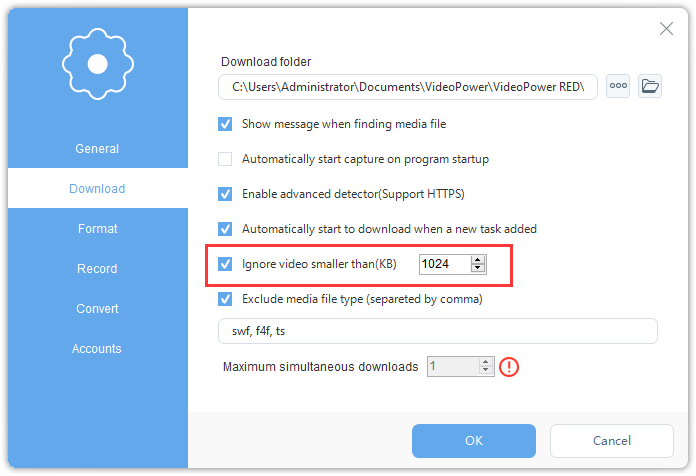
There are some websites, while you are downloading the videos, those advertisements will be downloaded automatically too.
Normally advertisement video size is smaller than the video you want to download.
You could set to “ignore video smaller than 1024KB (1MB)”, then most of the ads will be filtered out.
Specification
System Requirements
- OS: Windows 10 / 8.1 / 8 / 7 (32 / 64bit)
- CPU: 1GHz or higher
- Memory: 1GB or more (4GB or more recommended)
- Hard disk space: 15GB or more recommendedYour Content Goes Here
- Graphics: NVIDIA GeForce 9 Series / AMD (ATI) HD 4000 / Intel HD Graphics 2500 or later recommended
- Network: Internet connection required
- Others: net. Framework 4.0 or later required (automatic installation if insufficient), DirectX 9.0c or later required
Input & Output
- Download Mode: Paste URL , Detect from embedded browser , Detect from PC browserYour Content Goes Here
- Supported websites: YouTube, Google Videos, Facebook, Twitter, Instagram, Dailymotion, Metacafe, MegaVideo, Vimeo, Veoh, Nico Video, and 1000+ other video sharing sites
- Save video: 3GP, AVI, FLV, MOV, MP4, WEBM
- Save audio: AAC, MP3
- Input video: 3G2, 3GP, 3GP2, 3GPP, ASF, ASX, AVI, BIK, CSF, DAT, DIVX, DV, DVR, EVO, F4V, IVF, M2TS, M1V, M2V, M4P, M4V, MKV, MOV, MPV2, MP2V, MP4, MPEG, MPG, MR, MTS, MXF, OGM, PMP, PVA, PSS, RAM, RATDVD, RM, RMVB, RP, RPM, ROQ, RTSCM, SMK, QT, TP, TPR, TS, VM, VOB, VP6, WMV, WMP
- Input audio: AAC, AC3, AIF, AIFC, AIFF, AMR, APE, AU, CDA, DSS, DTSFLAC, FLC, FLV, M1A, M2A, M4A, M4B, M4R, M4P, MID, MIDI, MKA, MP2, MP3, MPA, MPC, MPCPL, OGG, RA, RMI, SND, TTA, WAV, WMA, WV, ASX, M3U, PLS, SMPL, WVX, WAX, WMX, MPCPL
- Output video: 3GP, ASF, AVI, DV, FLV, GIF, M4V, MKV, MOV, MP4, MPG, OGV, SWF, VOB, WEBM, WMV
- Output audio: AAC, AC3, AIFF, DTS, FLAC, M4A, M4R, MP2, MP3, OGG, RA, WAV, WMA
- Input video: Full screen , Selected Region, Around mouse, Web camera
- Input audio: System sound, Microphone, System sound and microphone
- Output video: MP4, WMV, AVI, MOV, FLV, MPEG, VOB, ASF
- Output audio: MP3, AAC, OGG, WMA, WAV, FLAC


