





Tips Index
There are many reasons why you need to capture the screen of your Windows 8 computer or other devices. Making snapshots help you report problems that you came across with your PC more straightforwardly.
It also enables you to instantly share images or any visible content displaying on the computer screen. Windows 8 provides an easier way to make a screenshot of a full screen than before.
Instead of using the “Print Screen” keyboard and paste into somewhere (Paint, Excel, Word, etc.) and then save it to a local folder, users can now save a screenshot to the “Pictures” folder as a png file automatically. Just hold down the “Windows” key and press the “Print Screen” button.
Though it’s convenient to capture screen on Windows 8 using the keyboard only, it only lets you screenshot the whole screen, and you have to use another tool to edit the screenshot.
Well, lucky for you we are here to introduce the best and easiest screencast software of all time called VideoPower GREEN. Now, there is no need for you to be bothered anymore about capturing only the whole screen of your computer since you’re on the right track. Check out this guide and click the link below to download the free app.
Stop thinking twice. Take a look at it and download the software with the link below.
Step 1: Manage settings before taking a screenshot on your windows 8
1) Click the menu on the upper right corner of the interface.
2) Choose “Settings” from the drop-down menu.
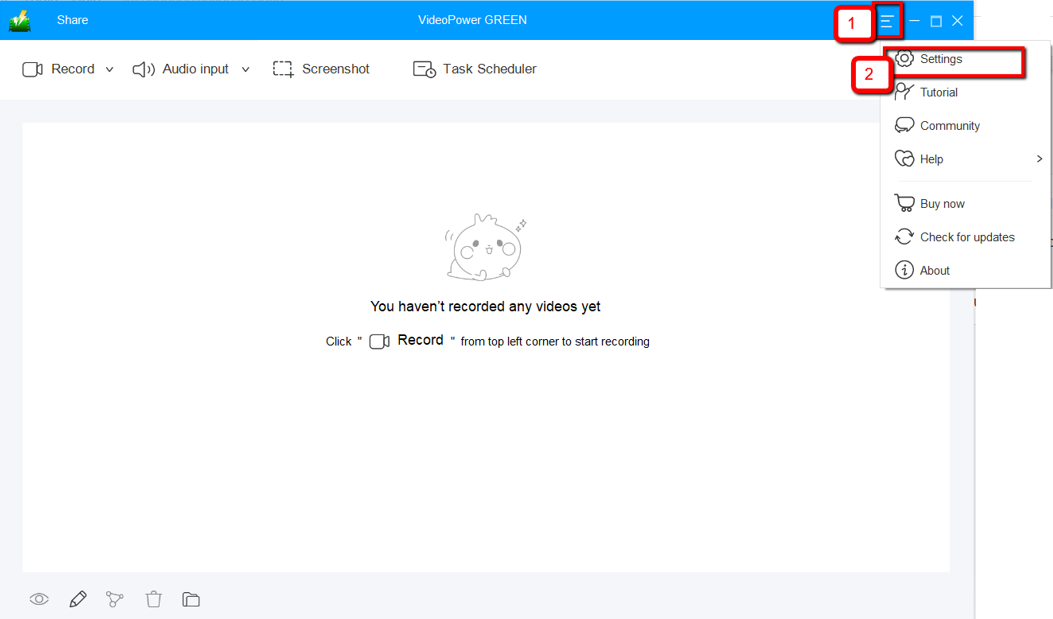
3) Navigate to the “Take Screenshot” section. Make changes accordingly then click “OK.”

Step 2: Take a screenshot on Windows 8
Click on the “Screenshot” tab.

1) Select the region on the screen that you want to take a screenshot of. By moving the mouse around the screen, you’ll be able to see what types of screenshots you can do.

2) After clicking, you will get a snapshot of the selected region. You can make changes to it accordingly by exploring the menu (highlighted in red) before saving the screenshot.

Conclusion:
Using VideoPower GREEN to take screenshots is great. It captures high-quality screenshots and lets you choose different ways to do it. Not only that, it enables users to record their screen too, such as full screen, a specific window or a specific area. It also has a feature where you can record the audio being played, microphone or system sounds.
This software has a screen recording tool as well. It has a video editor also where you can apply watermarks, effects, and other basic video editing options such as trimming or cropping. Adjust the speed, volume, contrast, brightness and saturation of a video.


