





Tips Index
The only thing that is consistent in a person’s life is change. Humans are created to experience change, a change that alters one’s existence in the world. Among all of those changes, there are those awaited moments in a person’s life and the wedding happens to be one of them.
A wedding is a ceremony where two people with different or the same sexes are united and bound as one under the glory of the Almighty. Wedding traditions and customs differ greatly in cultures, ethnic groups, religions, countries, and social classes but weddings are weddings. All of them mean the same despite the person’s differences. On the other hand, just like other events, people always ensure that nothing goes wrong from the opening of the program up to the end. Thus, the celebrants also gave efforts on their wedding invitations.
There are different schemes for making wedding invitations. Celebrants or wedding planners make use of the traditional invitation cards. As what people always do, invitation cards are customized or personalized postcards that have all the information about the occasion as well as the invitee’s and wedding participants’ names.
However, in today’s modern world, people ought to be doing new and applying e-style for wedding invitations and it results in discovering wedding invitation videos as an exceptional kind of invitation. But, to make it possible, third-party application software would be needed.
Thus, VideoPower BLUE, an amazing, trusted, and useful third-party application software is recommended for users that expect the best experience towards movie-making activities. This product is indeed the best Wedding Invitation – Movie Maker that offers the finest experience in movie making most especially wedding invitation video making.
VideoPower BLUE product helps users add themes and music to their videos. Users can also export their video to gain their desired quality. Moreover, this product possesses various professional features that can help users improve and ornament videos.
Start Wedding Video Making and Editing
Step 1: Import Wedding Videos or Images
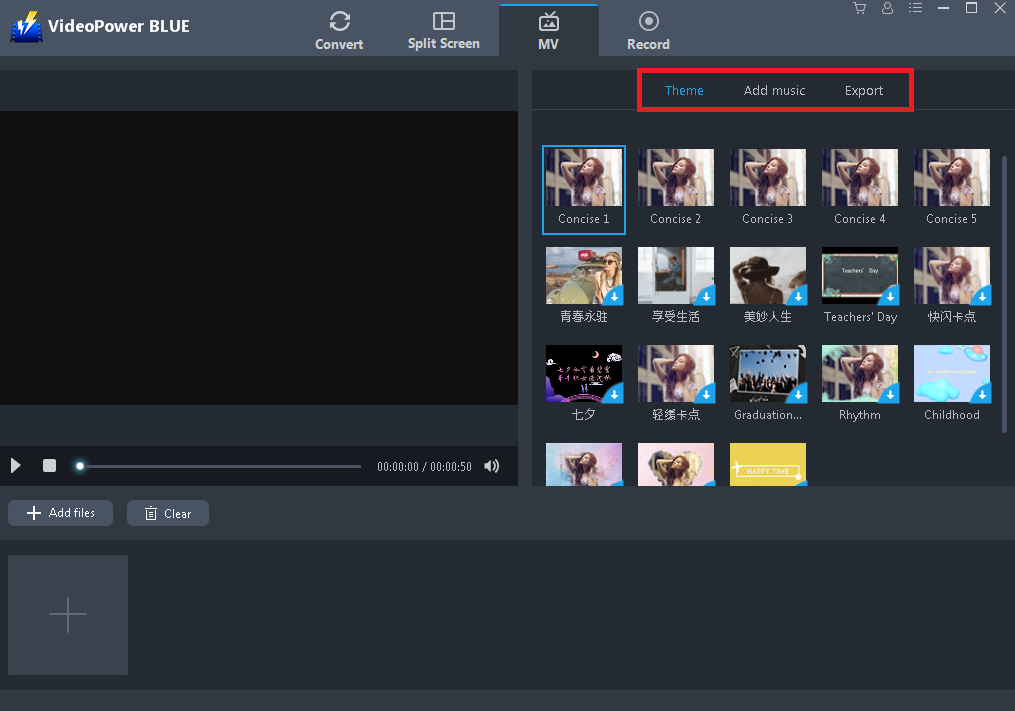
Navigate to MV window and import desired video and image files. Click the “+” button or “+ Add File” button to select files saved locally.

Step 2: Set the Theme, Add Music and Export
Choose the desired changes to the added files. Set the theme, add music, and export to a higher quality that best suited the wedding occasion. Setting up the desired volume is also possible.
Step 3: Edit Wedding Video
*This step is optional, users may edit the video or not.
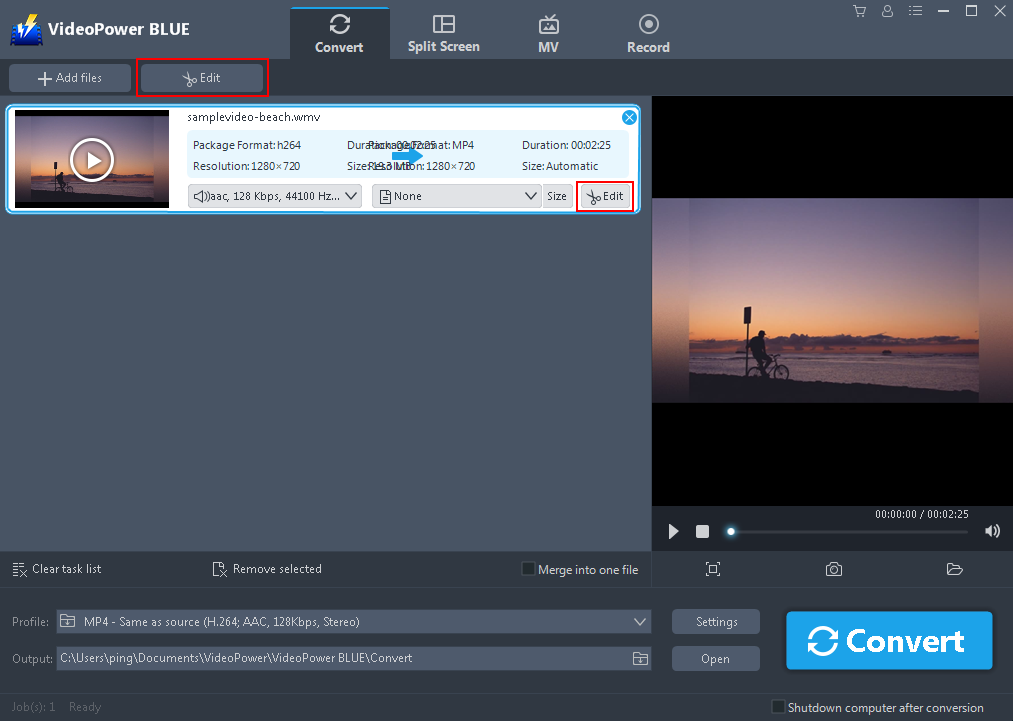
Users can edit the video by trimming, adjusting the size and position, managing the effects, and adding watermark and subtitle. To do so, click the “Edit button” after adding the video in the convert window.
Step 4: Profile and Output Format
*This step is optional, users may change the format and quality of the video or not.
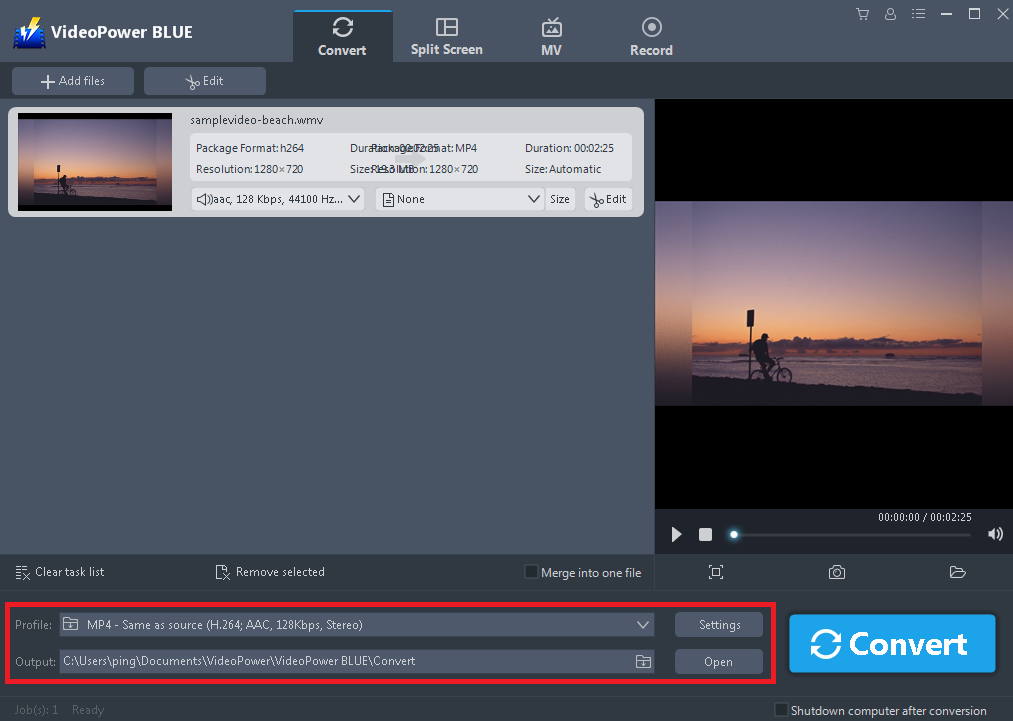
After editing the video, users may set the desired formats and other settings to enhance the quality of the video. To do so, click the “Profile” and “Output” search box, and the “Setting” button one at a time to set the desired quality and format for the video.
Step 5: Convert Wedding Video
After setting up the desired output format for the video, convert it to finalize. To do so, click the “Convert” button.

Conclusion:
Because of the effect of technologies, the development of digital applications and technologies nowadays affect users’ thoughts and ideas and become more creative and imaginative that brought them to modernize wedding invitations. Despite using traditional customized postcards as wedding invitations, celebrants and wedding planners thought of using wedding invitation video. Since creating invitations through videos with a movie maker app helps users to produce more creative, more attractive, and easy to distribute invitations, a third-party movie maker app is now on search.
With the use of the MV feature of the third-party tool called VideoPower BLUE, movie making is indeed possible. This product isn’t only useful in making videos but it is also best in its editing feature that can help users modify and beautify the content of the video. Moreover, this product also has more various amazing features such as converting with editing feature, split screen with different styles and filters that matches users taste, and recording feature that allows users to record either audio or screen or even both.


