





Video Convert | Record | Slideshow Maker
Make your own video clips or movies with fantastic themes
Transform multiple videos and photos in one frame as a collage
Trim, crop, rotate, effect, watermark, subtitle, etc. in video editing
Windows 7 / 8 / 8.1 / 10 supported
Video Power
BLUE

Overview
For All of Your Video Making Needs!

Convert Video

Edit Video

Video Collage

Slideshow Maker

Record Screen
Convert numerous video/audio formats for the various purpose from the options of the preset profile, with the file format and device compatability.
Using this powerful video editor, you can trim, crop, and rotate your videos. You can also add watermark and subtitles for copyright or whatever purpose it may serve.
- Trim & Cut : Remove unwanted video parts fast and easy.
- Crop : Keep the selected part of the screen.Your Content Goes Here.
- Rotate : Rotate or flip videos to different degrees and angles.
- Synchronization : Synchronize the video and audio that are not matched.
- Effect : Adjust speed, volume, contrast, brightness, and saturation.
- Watermark : Add customized logos and image/text watermarks.
- Subtitle : Apply subtitle file and edit the font,transparency, and position.
This tool transforms multiple videos and photos in one frame as a collage.
You can manually set the layout for the collage or choose from the given styles.
After that, you can apply filters, add background music, adjust the volume and export to HD MP4 to make your very own Video Collage movie.
Video Power BLUE also comes with a slideshow creation tool called MV Maker that can help you create great videos by adding videos and photos together.
The app can showcase your story to fit in any occasion, effortlessly make stylish movies using photos and music. Just drag & drop in your photos, music and even a video of some sort, smoothly add on a few of the array of built-in themes and your memories are transformed into wonderful movie file that you can share.
Record activities from your desktop screen specifying a region, full-screen, application window, or just the webcam of your computer along with system sounds and microphone. You can record HD videos with sound, webcam, and annotation in real-time. This is great for recording music videos, tutorials, webinars, live streaming, Skype calls, apps and games, and many other things in a hassle-free style.
Tips / Solutions
Convert your videos with 3 easy steps!


2. Output Settings
Choose a file format and output quality from the pre-setted profile list.

Best Video Editing Software
It has been long gone since video editing is only available to professionals in cinema and television production. Today, [...]
Wedding Invitation Video Maker
The only thing that is consistent in a person's life is change. Humans are created to experience change, a change [...]
Windows Movie Maker Vs iMovie and Alternative
Windows Movie Maker It is the unfinished video editing software of Windows Essentials software that offers an ability to create [...]
Best Way to Convert MP4 to AVI
MP4 is widely used because of fewer playback issues and is becoming the most widely-used format. It's perfect to [...]
How to Convert Video and Audio to iPad
It’s the portable years where everything can be brought in any size of palms there is! Do you want [...]
How to Resize MP4 Quick and Easy!
Many social media platforms are just coming out of nowhere today, from the usual that is Facebook to Instagram. [...]
COMPARISON (SIMPLE)
Feature Comparison of VideoPOWER BLUE and the series.
| Video Power Red |
Video Power GREEN |
Video Power BLUE |
Video Power YELLOW |
|
|---|---|---|---|---|
| Video Downloader | ✓ | |||
| PC Screen & Audio Recorder | ✓ | ✓ | ✓ | |
| Schedule recording task | ✓ | |||
| Video / Audio Editor & Converter | ✓ | ✓ | ✓ | |
| Create Slideshow | ✓ | |||
| Music Recorder & Downloader | ✓ | |||
| Screen Capture & Notation | ✓ |
Support
Frequently Asked Questions
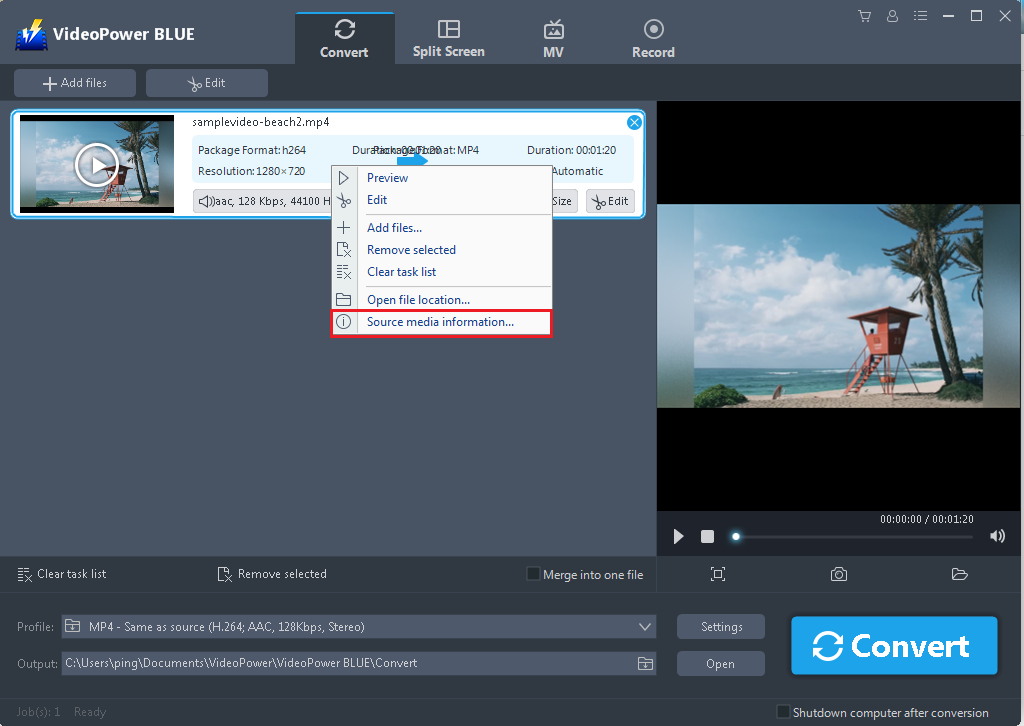
To get and save the format profile, codec, bit rate, file size and etc. or what users called as source media information of the video or audio, just add the file first, right-click the file and choose “Source media information” from the drop-down list. Then you will see a popup window showing all those information. So you can copy it or take a screenshot of it.
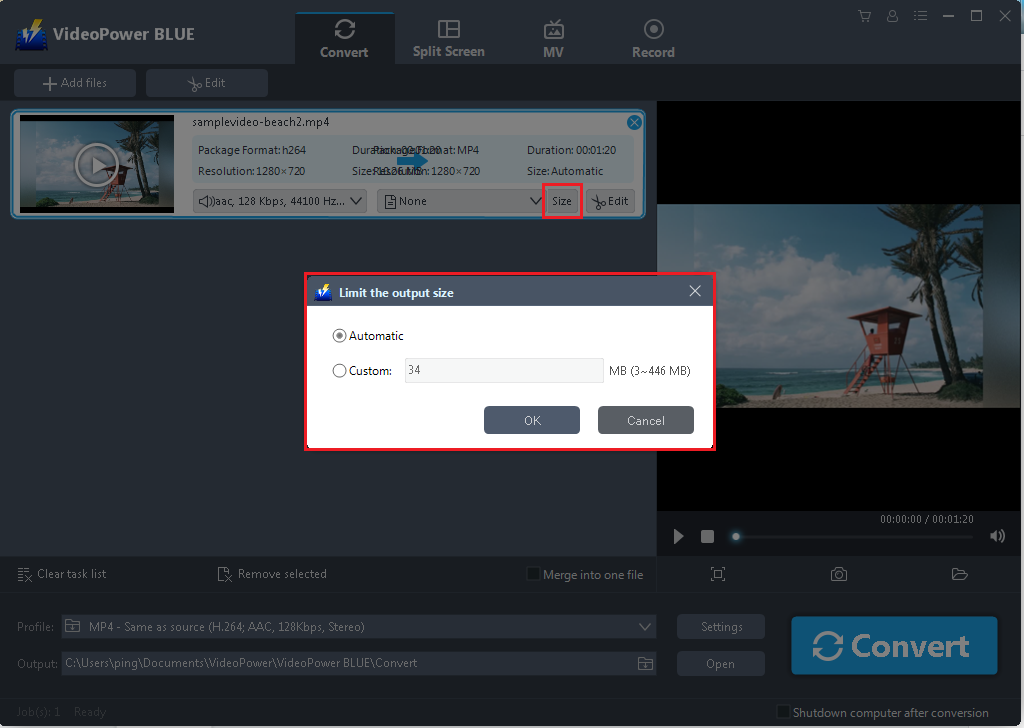
One smart factor regarding the conversion function of VideoPower BLUE is that it has an associate choice that enables users to limit the size of the video to be converted.
After adding the file, you can set the wanted file size as below.
You can search a subtitle and add it to a video in just one-click by using VideoPower BLUE.
The “Search subtitle” button is linked to a subtitle website:
https://www.opensubtitles.org/zh/search2/sublanguageid-all/moviename-00005

Specification
System Requirements
- OS: Windows 10 / 8.1 / 8 / 7 (32 / 64bit)
- CPU: 1GHz or higher
- Memory: 1GB or more (4GB or more recommended)
- Hard disk space: 15GB or more recommendedYour Content Goes Here
- Graphics: NVIDIA GeForce 9 Series / AMD (ATI) HD 4000 / Intel HD Graphics 2500 or later recommended
- Network: Internet connection required
- Others: net. Framework 4.0 or later required (automatic installation if insufficient), DirectX 9.0c or later required
Input & Output
- Input video: 3G2, 3GP, 3GP2, 3GPP, ASF, ASX, AVI, BIK, CSF, DAT, DIVX, DV, DVR, EVO, F4V, IVF, M2TS, M1V, M2V, M4P, M4V, MKV, MOV, MPV2, MP2V, MP4, MPEG, MPG, MR, MTS, MXF, OGM, PMP, PVA, PSS, RAM, RATDVD, RM, RMVB, RP, RPM, ROQ, RTSCM, SMK, QT, TP, TPR, TS, VM, VOB, VP6, WMV, WMP
- Input audio: AAC, AC3, AIF, AIFC, AIFF, AMR, APE, AU, CDA, DSS, DTSFLAC, FLC, FLV, M1A, M2A, M4A, M4B, M4R, M4P, MID, MIDI, MKA, MP2, MP3, MPA, MPC, MPCPL, OGG, RA, RMI, SND, TTA, WAV, WMA, WV, ASX, M3U, PLS, SMPL, WVX, WAX, WMX, MPCPL
- Output video: 3GP, ASF, AVI, DV, FLV, GIF, M4V, MKV, MOV, MP4, OGV, SWF, VOB, WEBM, WMV
- Output audio: AAC, AC3, AIFF, DTS, FLAC, M4A, M4R, MP2, MP3, OGG, RA, WAV, WMA
- Input image: BMP, DIB, HEIC, JPEG, JPG, PNG, RLE, TIF, TIFF
- Input video: 3G2, 3GP, 3GPP, AMV, ASF, AVI, BIK, DAT, DIVX, DV, DVR-MS, F4V, FLV, M2T, M2TS, M2V, M4V, MKV, MOV, MP4, MPEG, MPV, MTS, MTV, NSV, RM, RMVB, TOD, TRP, WEBM, WMV, WTV, XVID
- Input audio: AAC, AC3, FLAC, M4A, MP2, MP3, WAV, WMA
- Output video: MP4
- Record screen: Full screen , Selected Region, Around mouse, Web camera
- Record audio: System sound, Microphone, System sound and microphone
- Output video: MP4, WMV, AVI, MOV, FLV, MPEG, VOB, ASF, GIF
- Output audio: MP3, AAC, OGG, WMA, WAV, FLAC


