





Tips Index
This is the season in which people install hidden home security cameras on their homes, businesses, or even public places because there is a rising statistics when it comes to crimes and theft in every corner. To be able to control this, the government installed the best outdoor security system cameras in places where it is rampant in such crimes.
People also have the free will to protect their homes with webcam surveillance. CCTV cameras do have other purposes aside from its utilization for safety and security. Some households have surveillance cameras to know and monitor the movement inside the house. If you are a parent and away from home, you might want to monitor your kids and the household chores they are doing or simply having a lookout of your household if there are no burglars around. Surveillance recording also provides evidence and fragments on the household. For some larger households, it is used to monitor whether tenants are doing its job.
VideoPower GREEN is a powerful Windows 10 surveillance software that is able to schedule a task in the day and be able to check it. It is more than just monitoring but rather it has a specific frequency that enables you to control on what portion of the day you think your home is vulnerable or your workplace.
Schedule a screen recording
Step 1: Open Task Scheduler
After opening the software, click “task scheduler”.

Step 2: Set-Up the Task Scheduler
2.1 Edit recording frequency
1) Since this is a surveillance monitoring, tick check on the box “Daily”.
2) Set the time of the day where you want to be monitored.
3) Set the duration of the surveillance monitoring.
4) Set the “Repeat recording” feature if you want to cut the surveillance after a specific amount of time and repeat it again with the same duration.
5) Click “Stop Recording manually” or “Repeat Times” either if desired.
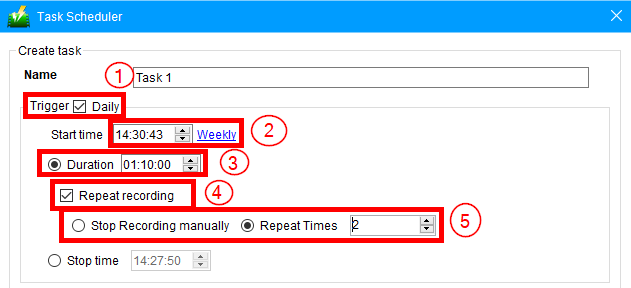
You can also set the specific days of the week you want to monitor.

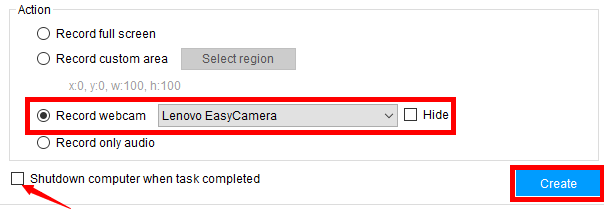
2.2 Set action settings
To monitor your house or outdoor places, click “Record webcam” and make sure web camera is connected directly to your computer and click on the desired webcam available.
Tick on the “Shutdown computer when task completed” if you want your computer to automatically shut down both surveillance and the system. To finish the task click “Create”.
Step 3: Check the task list
After clicking “Create” the task will be transported to the task lists and enlist your desired actions for surveillance monitoring.

Conclusion:
It is good to know that your household or workplace has a trusty software that enables you to transmit recordings of your hidden home security camera surveillance directly to your drive.
VideoPower GREEN is able to deliver powerful surveillance and monitoring at your place keeping you feeling safe and secured. More than that, it has multiple other features that could be used to your other tasks like screen capturing your computer display, recording your screen and audio, and can even edit video with its built-in editor. It’s more than just your usual screen recording software, it’s packed with solid amenities just for you! Try it now!


