





Tips Index
Rhapsody is an online music streaming service. Despite its popularity, it has not released a feature where you can download songs to be put into other devices.
It is a subscription-based online music service that offers two ways for its subscribers to enjoy a massive collection of music. Users can listen to Rhapsody music online by visiting its webpage or install its desktop software for more intuitive management of your music playlist.
Despite these features, many of its subscribers would like to enjoy Rhapsody music on their portable gadgets too especially when they are not connected to the internet.
The problem is how to download songs from Rhapsody to MP3 files on your devices? Let’s go through this article and you will find a way to download MP3 from Rhapsody.
First thing first, download the free audio recording software below and then follow the step-by-step guide.
To download the free software, just click on the link below.
Step 1: Set the sound source
Before recording the track, make sure that the sound source is set to “System sound.”

Step 2: Set the file format
Make sure that the recording is set in the format of “MP3.” – or whatever format you deem appropriate.

Step 3: Record
3.1 Start Recording
Click the start recording button at the bottom left of the screen.

3.2 Play the music
If you want to save songs from Rhapsody/Napster, play the track for a successful recording.

3.3 End the Recording
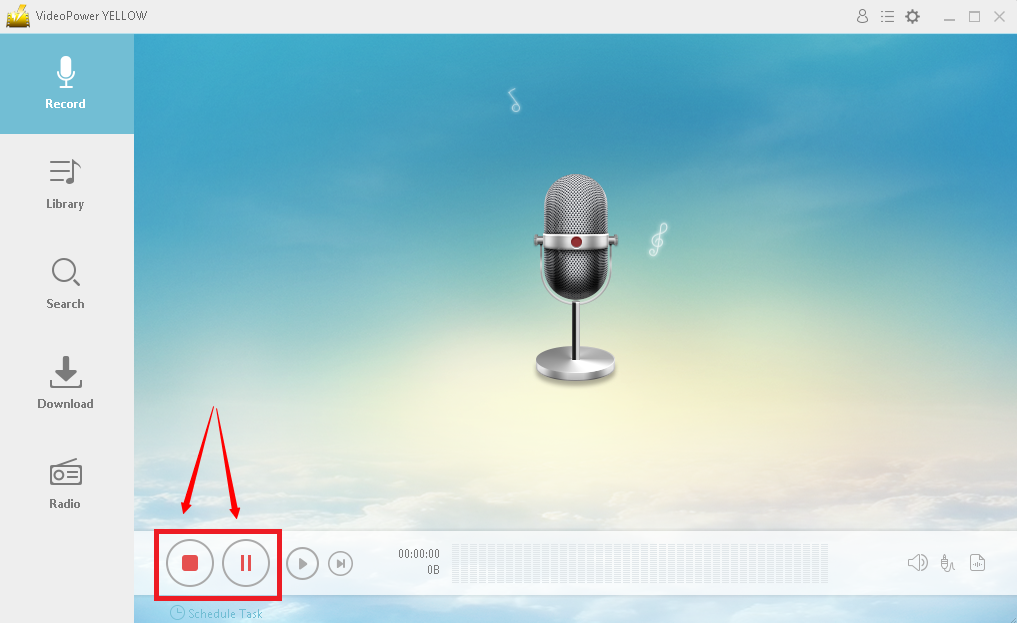
While recording, you can pause in case you have some parts that you don’t want to include in the recording. To pause, click the button beside the start/stop button.
When you are done, click the stop button to end the recording.
After recording, right-click the recorded track icon and click “Open folder” to open the storage location of the recorded audio file or click “Delete” if you want to delete the file and record again.

Conclusion:
Because most online music streaming platforms do not feature a download option for their music, people opt to use online software or converters to save their music for offline listening. However, there is always a risk when it comes to using free software. With VideoPower YELLOW, you can guarantee that you can download music from Rhapsody or Napster safely and easily.


