





Tips Index
Is it possible to record VoIP calls?
As years passed, people are upgrading to Voip and wonder if they can record VoIP calls or not. Technically speaking, it is not difficult to record VoIP calls, VoIP vendors actually offer call recording features for free or with extra charges.
But considering privacy and legality, different nations have a shifting constitution that takes control who can record phone calls whether they require consent or not from the other party. For some countries recording calls under any circumstance made by individuals is illegal while the organization can do it under a specific law.
But for other countries, they made it legal for both individuals and organizations to record calls providing all parties to be aware that it is being done.
Why record VoIP calls?
It is not actually a daily requirement for an individual to record VoIP calls but time will eventually come perhaps a few times a year that something might need to be recorded. But for some professionals, they often do recordings when interviewing people over the phone or for news reports, podcasts, and many more. There are tons of different reasons for call recording services, some might also be required on a daily basis.
For instance, customer service representatives might get reviewed for their interactions in order for them to improve quality, or for evaluation, and for training other new agents. They may also use it to comply with legal and regulatory requirements.
Recording calls for service interactions with partners, distributors, suppliers, and important clients is very important to keep some records. And security is mostly the biggest reason why one should record a VoIP call.
How does call recording work?
It actually has a feature built into the program or application that is offered by the VoIP vendor or by the third party client. All you have to do is to go to the setting or press a button in the software. VoIP providers offer impenetrable control to whoever has the control to record calls.
But although it doesn’t require any specific software, you might also need another recorder just in case you don’t know how to navigate the settings, so we highly recommend you to download VideoPower YELLOW.
This VoIP recording software can record VoIP calls in the best quality format without quality loss. It can extract audios online, or in your microphone, or even system sounds. It is the best recorder for VoIP calls that can also download music online, has a built-in radio feature with tons of amazing stations you can choose from, and you can use all of these features for free. You might as well want to upgrade to the full version to experience its full feature!
Just click the link below to download its free trial and follow through the guide on how to record VoIP calls on pc
Step 1: Make settings before recording.
To record VoIP audio streaming on the PC, make sure that the sound source you chose is “System Sound and Microphone”.

Make sure that the recording of VoIP is set in the format of “MP3”, or you can change it to whatever format you want.

Step 2: Start to Record VoIP
Click the start recording button at the bottom left of the screen while taking calls.
The same button works for “Stop”, so you can end the recording.

After you stopped recording, you can right-click the recorded VoIP track icon and choose the “Open folder” to open the storage location of the recorded audio file.

Task Scheduler
If you don’t have time to sit in front of the computer and keep waiting for the recording to end, this setting is for you.
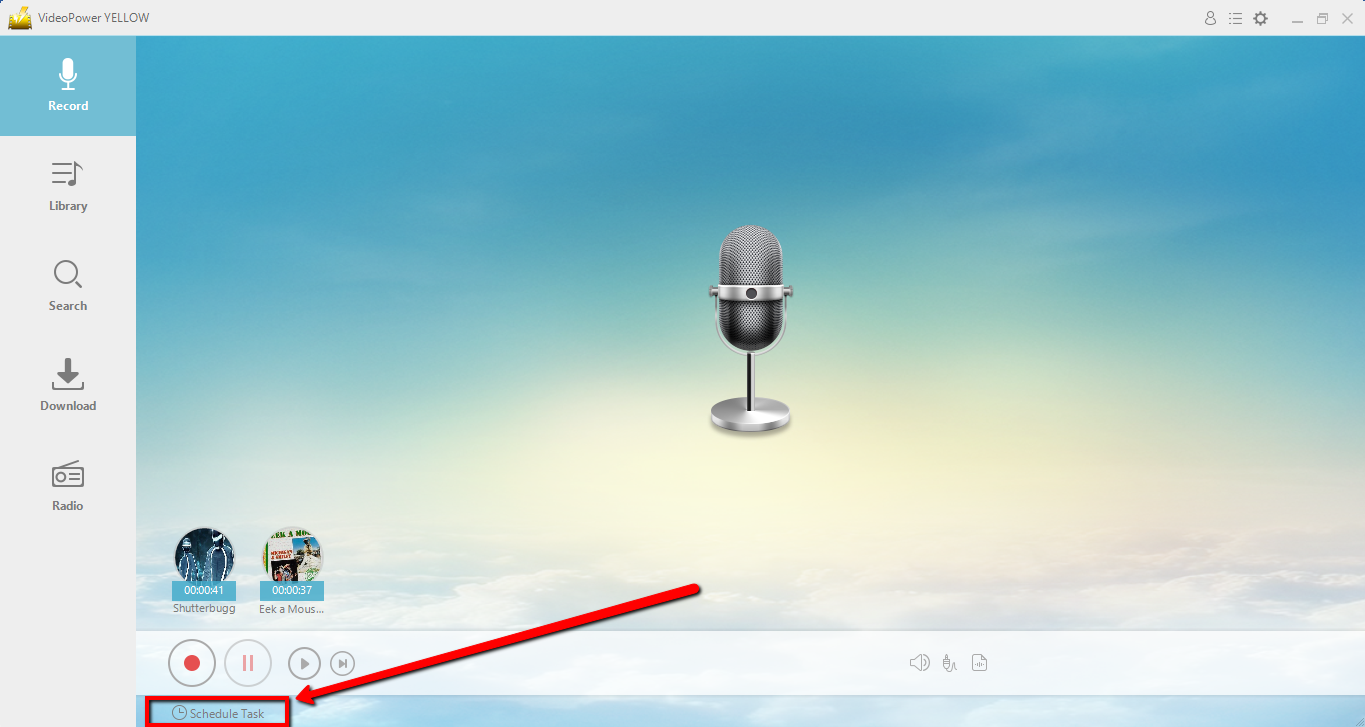
Step 1. Navigate to Schedule a Task
Click “Schedule Task” at the lower left of the main interface.
Step 2: Create a Task
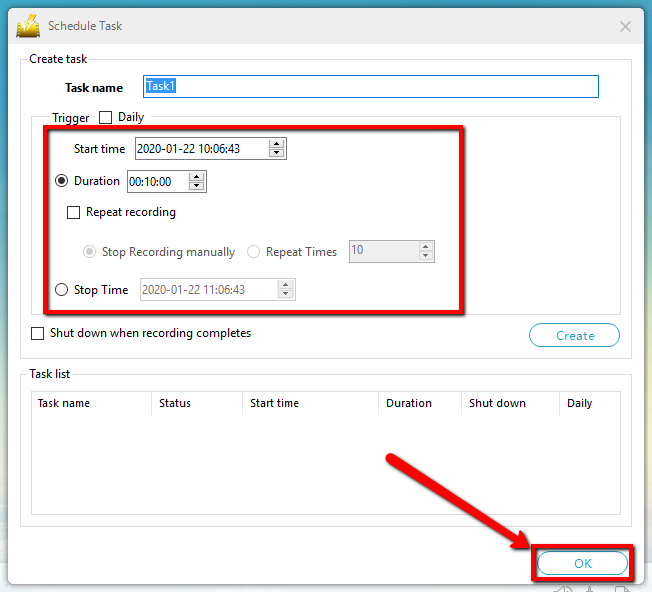
Create a task and set the start and end time as preferred. Click “OK” to save the task.
Make sure that your PC is on and running, as well as VideoPower YELLOW.
Conclusion:
For a typical person, phone call recordings are mostly done by multinational corp. or police departments. Actually, this is mostly true when it comes to Public switched telephone network (PSTN) lines where recording calls required hardware or software with legal permission.
Wiretapping is illegal in many countries for officials of law enforcement and private individuals often taking an adverse view of someone doing so, even just doing it for a prank or desire.
The first choice for recording VoIP conversations is VideoPower YELLOW, designed to meet your needs. The best VoIP recording software, not just good at recording audio, it can also edit audio tracks, convert various audio formats, burn and RIP audio files to CD. You can also search and download music through this app by typing the name of the song directly to the search bar. Download now!


